Document intake
Receive files through uploads, inboxes, shared folders, scanners, or APIs and retain the original document with useful processing metadata.

OCR and document intelligence
Convert PDFs, scans, forms, and images into structured information your people and systems can use.
BlueMouse.ai builds document-processing pipelines that classify files, extract text and fields, validate results, and route uncertain cases for review. The goal is not simply readable text. It is reliable, traceable data that can enter a business workflow or become searchable knowledge.
What we build
OCR converts pixels into characters. Intelligent document processing adds the context and controls needed to identify a document, capture the right values, check them, and deliver an approved result.
Receive files through uploads, inboxes, shared folders, scanners, or APIs and retain the original document with useful processing metadata.
Handle rotation, skew, contrast, page separation, and quality checks where source condition would otherwise weaken recognition.
Identify document types and direct invoices, contracts, forms, claims, reports, or correspondence to the appropriate extraction logic.
Capture full text or specific values such as identifiers, dates, parties, totals, line items, clauses, and table rows.
Apply format, cross-field, reference-data, and business-rule checks while preserving confidence and provenance for each result.
Send approved structured output to a database, review queue, business application, downstream API, or RAG knowledge pipeline.
Delivery process
Collect representative documents, including varied layouts, scan quality, languages, handwritten elements, and difficult edge cases.
Agree document classes, required fields, output schema, validation rules, review thresholds, integrations, and acceptance criteria.
Implement preprocessing, recognition, extraction, validation, and routing, then evaluate results against reviewed reference data.
Release the workflow, track exceptions and source changes, and improve the pipeline as new formats and failure patterns appear.
Quality and evaluation
A single page-level accuracy figure can hide costly mistakes. Evaluation should reflect the specific document population, the importance of each field, and what happens when the system is uncertain.
Build a reference set across common layouts and difficult cases. Compare extracted text, fields, tables, classifications, and validation results with human-reviewed values. Separate critical fields from low-impact content so acceptance reflects business risk.
Confidence, missing fields, conflicting values, unreadable pages, and failed rules can send a document to a review queue. Corrections should be recorded so teams can diagnose recurring source or model problems.
Inputs and outputs
The clearest way to judge an extraction service is to see what it does with a real-looking document. This invoice is fictional; the smudged handwritten purchase order reference and the checks are typical of live invoice streams.
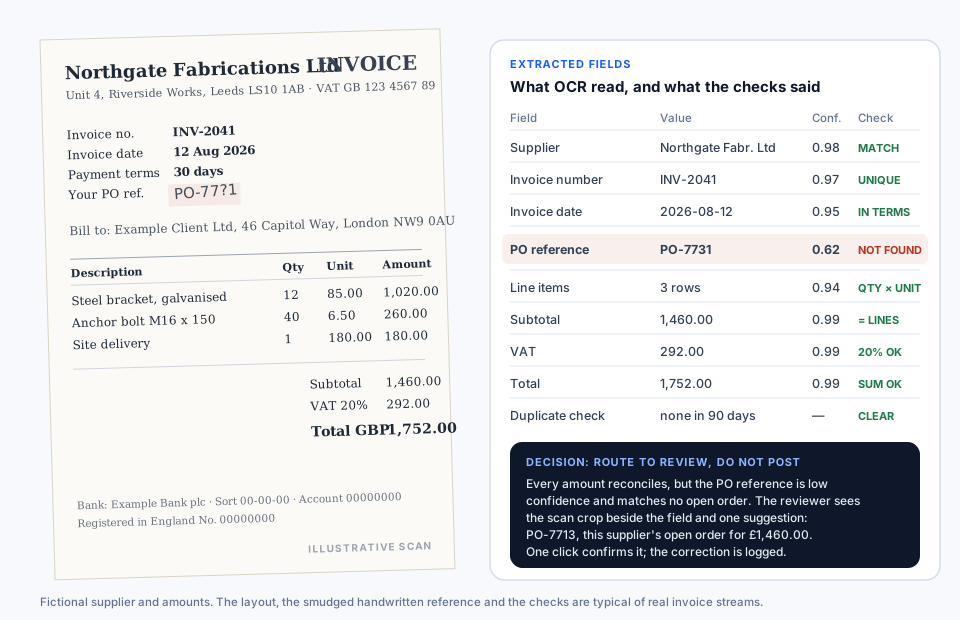
Supplier, invoice number, date, three line items, subtotal, VAT, and total were captured with confidence between 0.94 and 0.99. The purchase order reference, handwritten and smudged, was read as PO-7731 at 0.62. Each value carries its confidence and its position on the page.
Supplier matched the master record. Line amounts equalled quantity times unit price, the subtotal equalled the sum of lines, VAT was 20% of the subtotal, and the total reconciled. No duplicate in 90 days. One check failed: no open purchase order PO-7731 exists for this supplier.
The scan crop of the handwritten reference beside the field, its confidence, and one suggestion: PO-7713, this supplier's only open order, valued at exactly the reconciled subtotal of £1,460.00. One click confirmed it. The correction was logged against the document.
A structured invoice record with the corrected reference, its source marked as reviewer-confirmed, every check result attached, and the original scan linked. Posted to the finance system only after that approval. Without validation the same invoice would have been rejected or posted against the wrong order.
Read the full worked example and the checks we runSecurity and deployment
Design authentication, role-based access, retention, logging, and separation around originals, extracted data, corrections, and exports.
Review security and governanceCombine managed OCR services, private cloud components, on-premise models, or hybrid processing based on data residency and capability needs.
Compare deployment optionsAssign reviewers by document type, risk, confidence, or failed validation and require approval before selected data reaches a system of record.
See controlled AI agentsIntegrations and RAG
Document workflows can receive files from email, shared drives, scanners, portals, and APIs, then send reviewed output to ERP, CRM, document management, case-management, database, or custom application interfaces. Integration scope follows the systems and permissions you already operate.
OCR can preserve text, layout, tables, page references, document type, and validation status for indexing. A RAG service can then retrieve relevant evidence and return cited answers across scanned and digital sources without losing the path back to the original.
Explore enterprise RAG developmentDecision guidance
Common questions
Digital PDFs, image-only PDFs, scans, photographs, forms, invoices, reports, contracts, and mixed document packets can be assessed for a suitable pipeline.
Evaluate each required field or content type on representative documents and define what must be reviewed when confidence or validation is insufficient.
A representative document sample, required outputs, business rules, current process, destination system, security constraints, and expected review responsibility.
Start with one document type
We will help define the fields, validation rules, review path, integration, and evaluation needed for a focused OCR and document-processing pilot.