
Ask an accounts payable team what goes wrong with invoice automation and they rarely say "the OCR misread a character". They say an invoice was posted against the wrong purchase order, or paid twice, or approved with VAT at the wrong rate, or sat in a queue for three weeks because nobody could tell why it had been flagged. Every one of those is a validation failure, not a recognition failure. This article walks through one illustrative invoice to show where the value in invoice OCR actually sits.
The invoice, supplier, and amounts below are fictional. The layout, the smudged handwritten reference, and the checks are typical of real invoice streams we design for.
Why does invoice OCR fail after the text has been read correctly?
Recognition converts pixels into characters. On a printed invoice with a normal scan, current engines do that with very few errors. But a finance process does not need characters; it needs a posting decision. Between the two sit questions that no OCR engine answers on its own: Is this supplier one we trade with? Does the purchase order exist, and does it belong to this supplier? Do the line items add up to the subtotal, and does the subtotal plus tax equal the total? Have we seen this invoice before? Is the VAT treatment right for this supplier and category?
When those questions are skipped, the pipeline produces well-formatted data that is confidently wrong. When they are answered, the pipeline can post the routine invoices automatically and hand a person only the ones that genuinely need judgement. The difference between the two designs is not the OCR engine. It is the validation layer and how it uses confidence.
A worked example: one supplier invoice with one smudged field
The invoice below arrived as a slightly skewed scan. The printed fields are clear. The purchase order reference was written by hand and one digit is smudged.
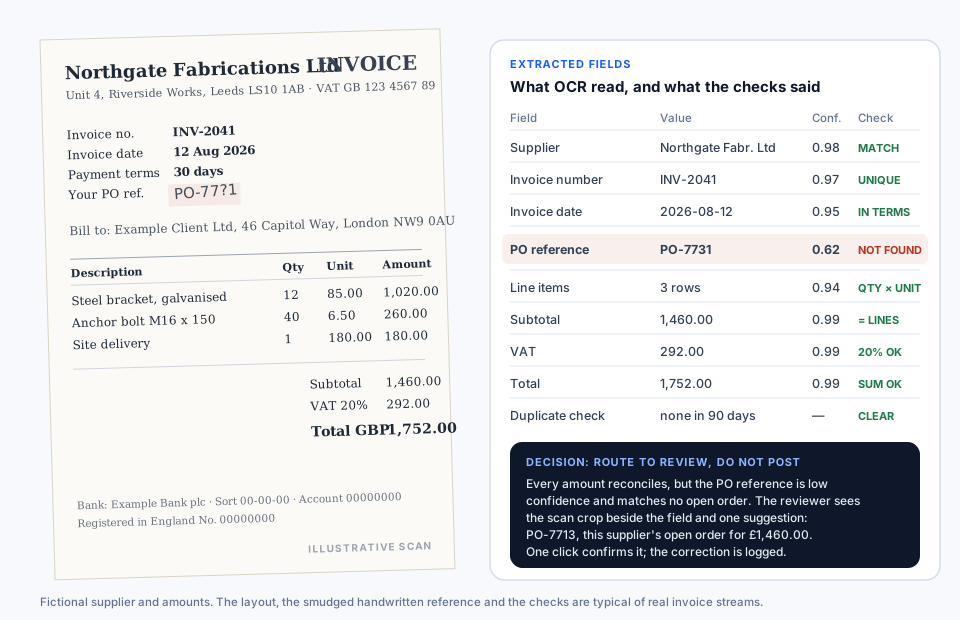
Here is what the pipeline extracted and what each check concluded.
| Field | Value read | Confidence | Check applied | Result |
|---|---|---|---|---|
| Supplier | Northgate Fabrications Ltd | 0.98 | Match against supplier master, including VAT number | Pass |
| Invoice number | INV-2041 | 0.97 | Unique for this supplier in the last 90 days | Pass |
| Invoice date | 12 August 2026 | 0.95 | Not in the future, within payment terms window | Pass |
| PO reference | PO-7731 | 0.62 | Must exist as an open order for this supplier | Fail: not found |
| Line items | 3 rows | 0.94 | Quantity multiplied by unit price equals line amount | Pass, all three |
| Subtotal | 1,460.00 | 0.99 | Equals the sum of line amounts | Pass |
| VAT | 292.00 | 0.99 | 20% of subtotal, rate valid for supplier and category | Pass |
| Total | 1,752.00 | 0.99 | Subtotal plus VAT | Pass |
| Duplicate | none | n/a | Same supplier, amount and near-identical reference in 90 days | Pass |
Eight checks pass. One fails. A pipeline that only looked at recognition confidence would still have been uneasy about that field, at 0.62, but it would not have known what to do about it. A pipeline that only looked at business rules would have seen an unknown purchase order and rejected the invoice back to the supplier, adding a week to payment for what is almost certainly a one-digit misreading.
What does a good exception look like?
The right outcome is neither. The invoice is routed to a reviewer with three things attached: the crop of the scan showing the handwritten reference, the field as read with its confidence, and a suggestion. The suggestion comes from combining the checks that passed with the one that failed: this supplier has one open purchase order, PO-7713, and its value is £1,460.00, exactly the subtotal that reconciled. The reviewer sees the smudge, sees the suggestion, and confirms it in one click. The correction is logged against the document, so the same supplier's handwriting is better handled next time and the audit trail shows who decided what.
That is the whole design in miniature. Extraction produces candidates with confidence. Validation turns candidates into pass, fail, or uncertain. Exceptions carry evidence and a proposed answer. A person decides only where a decision is genuinely needed, and nothing is posted without either a full set of passing checks or an explicit approval.
Which checks should an invoice pipeline run?
The set varies by organisation, but these are the ones we configure with almost every finance team, in roughly the order they catch problems.
- Supplier identity. Name, VAT number, and bank details matched against the supplier master. A bank detail that differs from the master is the single most important exception a pipeline can raise, because it is how invoice fraud usually arrives.
- Purchase order match. The reference must exist, belong to the supplier, and be open. A two-way match compares the invoice with the order; a three-way match also requires the goods receipt, so nothing is approved for items not received.
- Arithmetic. Line amounts equal quantity times unit price, the subtotal equals the sum of lines, and the total equals subtotal plus tax. These checks are cheap and catch both OCR misreads and supplier errors.
- Tax treatment. The VAT rate is valid for the supplier and the spend category, and the VAT amount follows from it. Reverse-charge and zero-rated cases need explicit rules rather than a single expected percentage.
- Duplicates. Same supplier, same amount, and the same or near-identical reference within a window. Near-identical matters because rescans and resubmissions often differ by a character.
- Tolerances. Small differences between invoice and order, in price or quantity, are allowed within thresholds set per supplier or category, so rounding does not create work.
- Dates and terms. Invoice date not in the future, due date consistent with agreed terms, and early-payment discounts applied where they exist.
How should confidence scores be used?
Recognition confidence is useful only when it is tied to a decision. Three practices make it work. First, thresholds are set per field, not per document: a 0.90 on a free-text description is fine, while a 0.90 on a bank account number is not. Second, confidence is combined with the business checks rather than used alone: a low-confidence field whose value nonetheless passes every check, such as a total that reconciles perfectly, rarely needs a human, while a high-confidence field that fails a check always does. Third, thresholds are calibrated on a reviewed sample of your own invoices, because engines report confidence differently and the right cut-off for one supplier's layouts is wrong for another's.
How do you evaluate an invoice OCR pipeline?
A single accuracy percentage hides the failures that matter. We measure a pipeline against a reviewed set of real invoices from the actual stream, and we report at least these numbers separately.
- Field-level accuracy for critical fields. Supplier, amounts, tax, dates, and references, each on its own, because a 99% document average can conceal a 90% total-amount accuracy.
- Straight-through rate. The share of invoices that pass every check and post without a person, which is the number that determines the business case.
- Exception precision. Of the invoices routed to review, how many actually needed a decision. Low precision means reviewers stop reading the queue carefully.
- Missed exceptions. Invoices that posted automatically but should not have, found by sampling posted invoices. This is the most important and least measured figure.
- Time to resolution. How long exceptions wait, and how many touches they take, because a pipeline that creates a slow queue has moved the cost rather than removed it.
Run the same set again whenever the supplier mix, the engine, or the rules change. Suppliers redesign their invoices without telling anyone, and a pipeline that was measured once and never again drifts silently.
What this means for a finance team considering OCR
Judge an invoice OCR proposal by its validation layer, its exception design, and its evaluation plan, not by a headline recognition accuracy. Ask how a low-confidence purchase order reference would be handled, what the reviewer would see, and how the vendor will measure missed exceptions after go-live. If the answers are vague, the automation will be too.
Our OCR and document processing page sets out how we build these pipelines, the finance document workflow page shows the matching rules we configure, and how it works explains the path from a first conversation to a measured pilot. Bring a folder of your real invoices, including the awkward ones. That is where every useful pipeline starts.
Related reading
Once invoices are validated they often become a knowledge source. Why legal RAG needs hybrid search explains how exact references and natural-language questions are retrieved together, a problem that applies to invoice numbers and supplier names as much as to section numbers in statutes. All articles are listed on the Insights page.